Skip to content

For South African businesses that run their own vehicles

Plan the day in one click. Know every delivery landed.

Delivery shares the day’s work across your drivers and vehicles, puts each stop on the driver’s phone, and captures signature, photo and GPS at the door. The office sees it live, and customers stop phoning to ask.

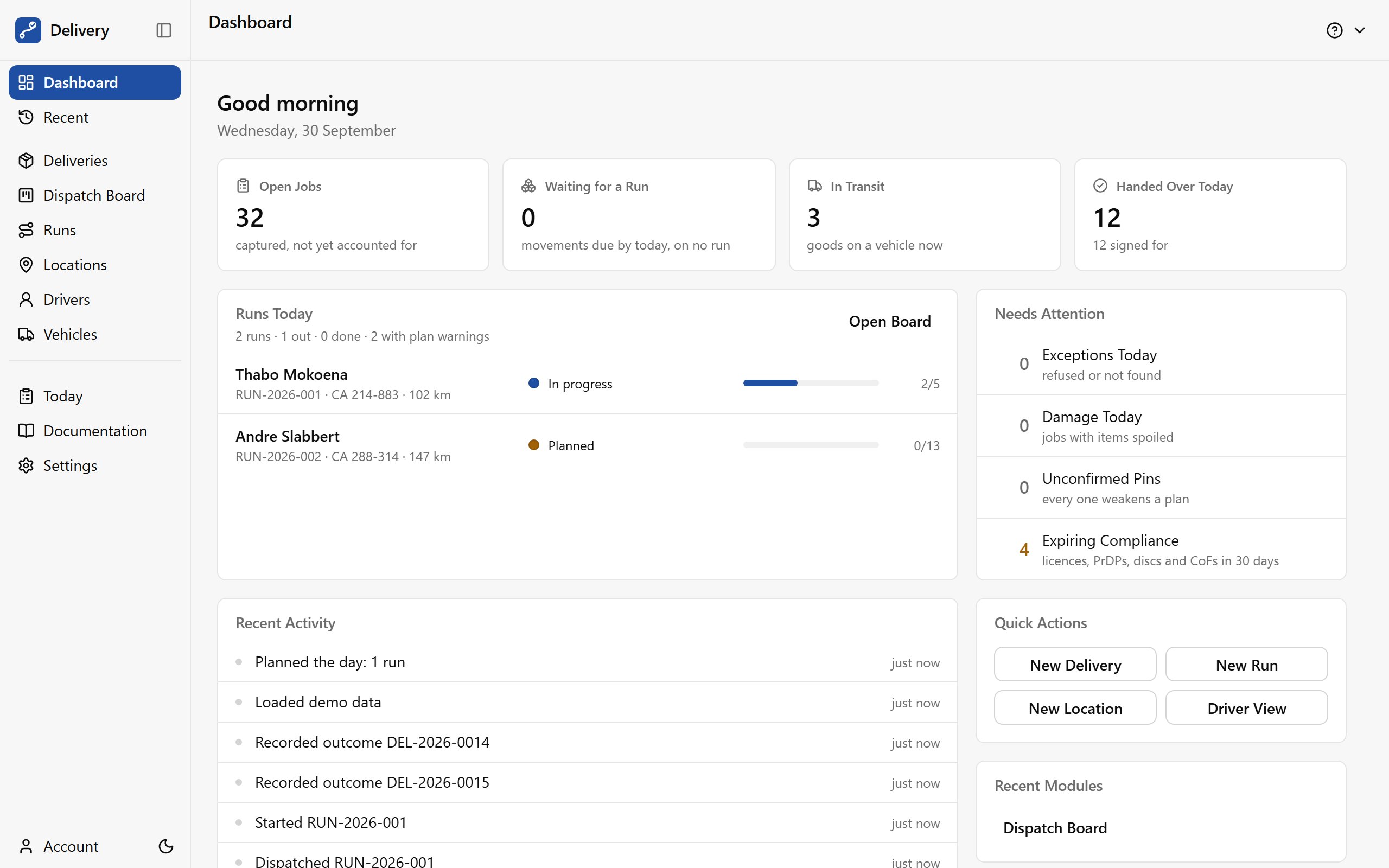
The Dashboard: today’s runs and their progress, with the exceptions listed first
  • Route planning includedNot a tier above you.
  • Works without signalCapture offline, sync when it returns.
  • Nothing to installA web link on the phones you have.
  • One flat price per driverOffice users do not add to the bill.

Where the day falls apart

You know each of these. Here is what replaces them.

The day is planned for you

Plan the Day shares every waiting delivery across the drivers and vehicles you choose, in driving order, inside every window and every load.

Right nowThe day shared out on a whiteboard, in whatever order it happened to be captured.
Proof on the record in seconds

Signature, photo, GPS pin and timestamp, attached to the delivery at the door. Searchable, and one link away for the customer.

Right nowA signed paper note in a lever-arch file. Six weeks later, someone walks to the shelf and hopes.

Short and damaged are two numbers

Every line carries what was sent, what was taken, and what was refused as damaged, with a reason the driver must give before finishing.

Right now“Six short” in a margin, or said at the gate and never written down at all.

The problems come to you

The Dashboard shows every run’s progress and today’s exceptions first: refused, not found, anything damaged.

Right nowPhoning the driver all afternoon. Where are you, did they take it, did anyone sign.

Typed once, known next time

The first delivery to a place remembers it. The next one arrives with its pin, its contact and its window already filled in.

Right nowRetyping every email and WhatsApp order by hand, the address slightly differently each week.

Loaded in the right order

Switch on the 3D load plan and each vehicle is packed last drop first, so every stop’s goods are nearest the doors when the driver gets there.

Right nowUnloading half the truck at the first stop to reach a box that should have gone on last.

How it works

From the order to the signature at the door

Three steps a morning, and the app does the arithmetic.

1 · Plan

Plan the day in one click

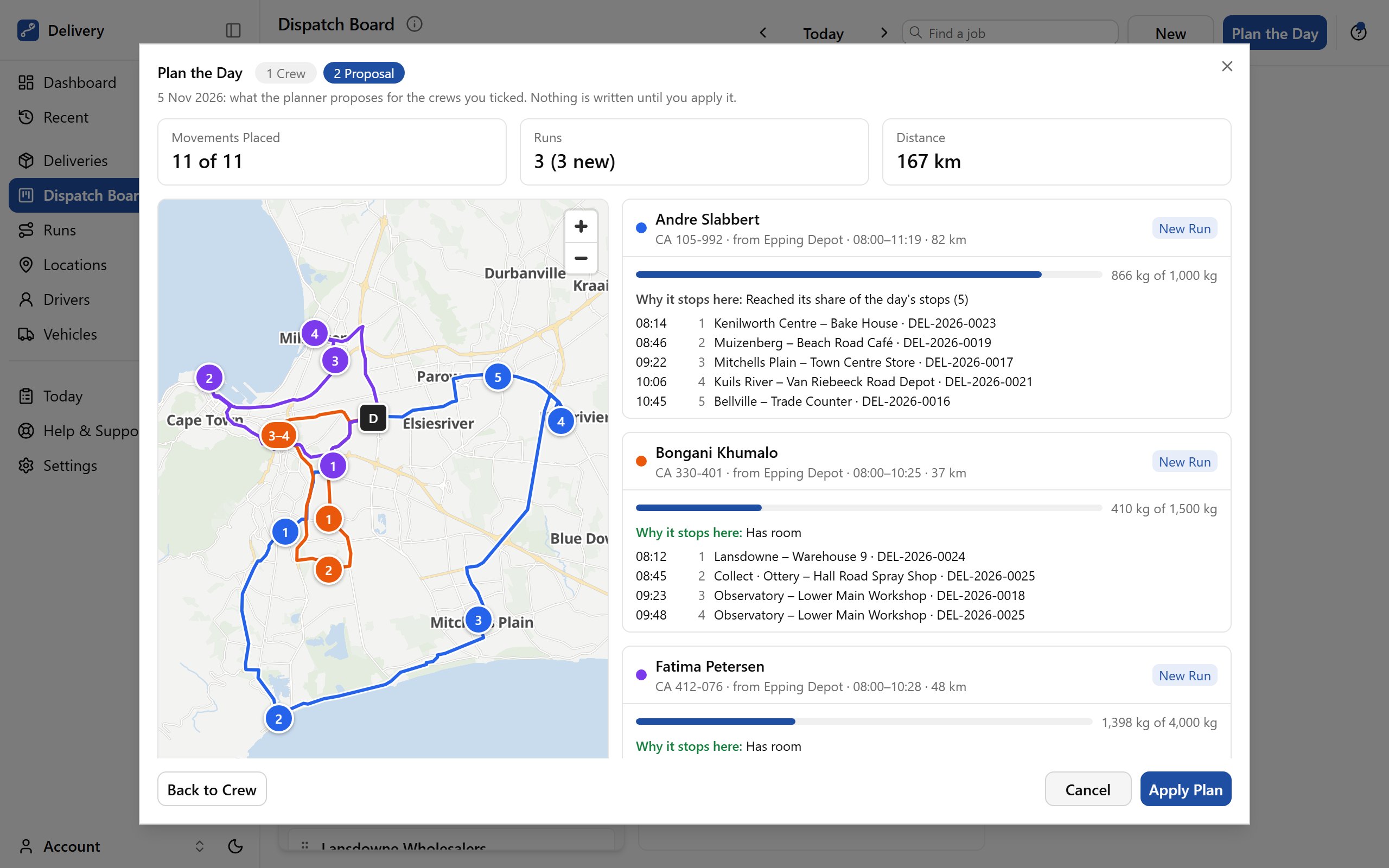
Plan the Day puts the whole day to the route planner at once and shows you the runs it would make: who takes what, in which order, when they get there, and why each run stops where it does.

  • Every movement due today, shared across the drivers you tick, each in their usual vehicle
  • Inside each customer’s delivery window, each vehicle’s weight and deck, and each driver’s hours
  • Out from the depot and home again, with the time spent at each door
  • A proposal first: nothing changes until you apply it, and anything that cannot fit is named with why
Plan the Day: the proposal, with the runs on the map and each run’s stops in order, times, kilometres and load against the vehicle

2 · Dispatch

One board for the whole day

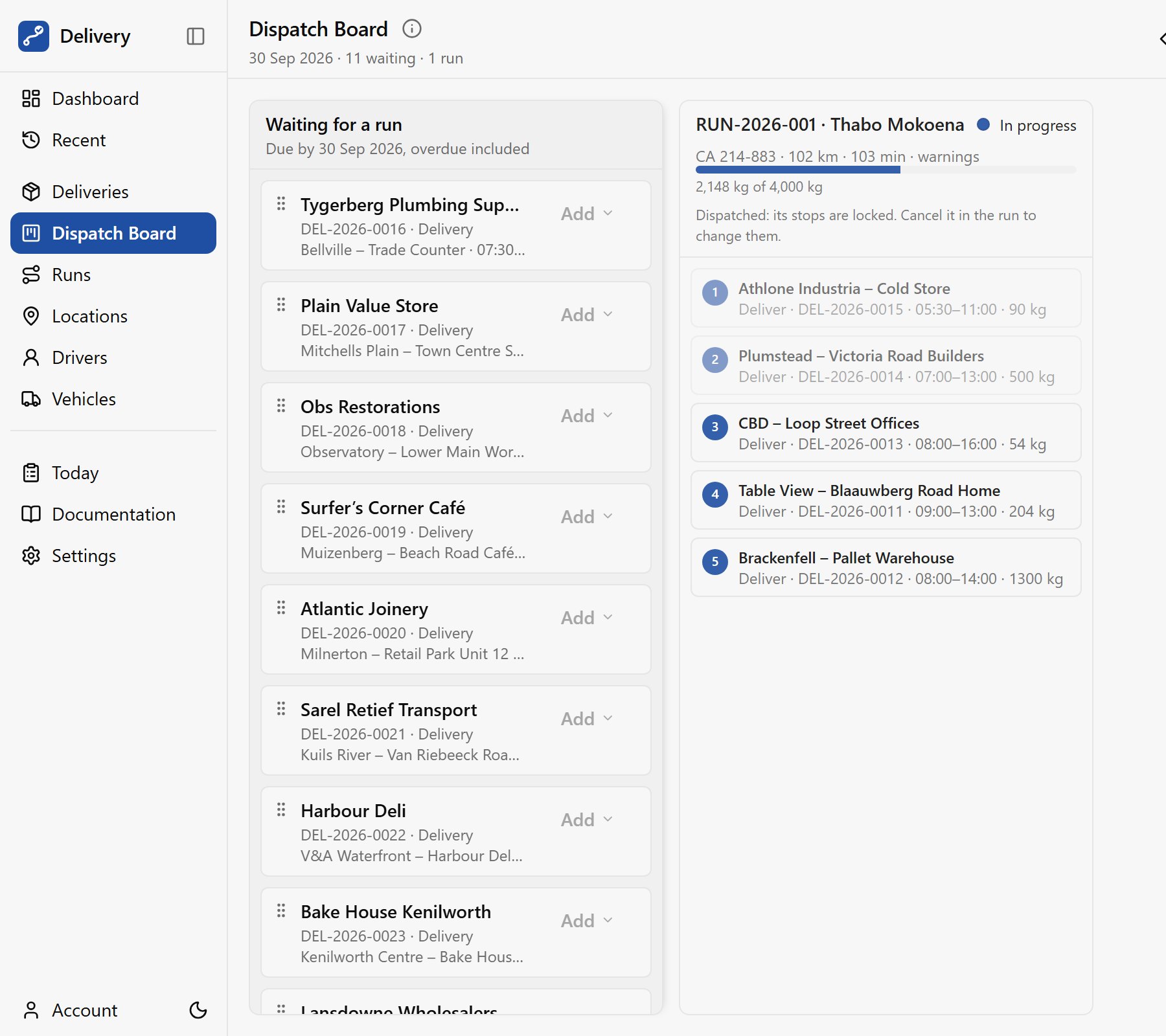
The Dispatch Board lays the day out side by side. Move work between runs, plan a route again, and dispatch each driver when their sheet is right.

  • One column per driver and vehicle, the load filling as you add stops
  • Drag a delivery across to move it; the plan is yours to overrule
  • Each run on a map before it leaves the yard, and in 3D when you use the load plan
The Dispatch Board: the day’s work waiting for a run beside a run already on the road, its load against the vehicle

3 · Deliver

The driver’s phone does the paperwork

No app store and nothing to install: a web link on the phone the driver already carries, added to the home screen in two taps.

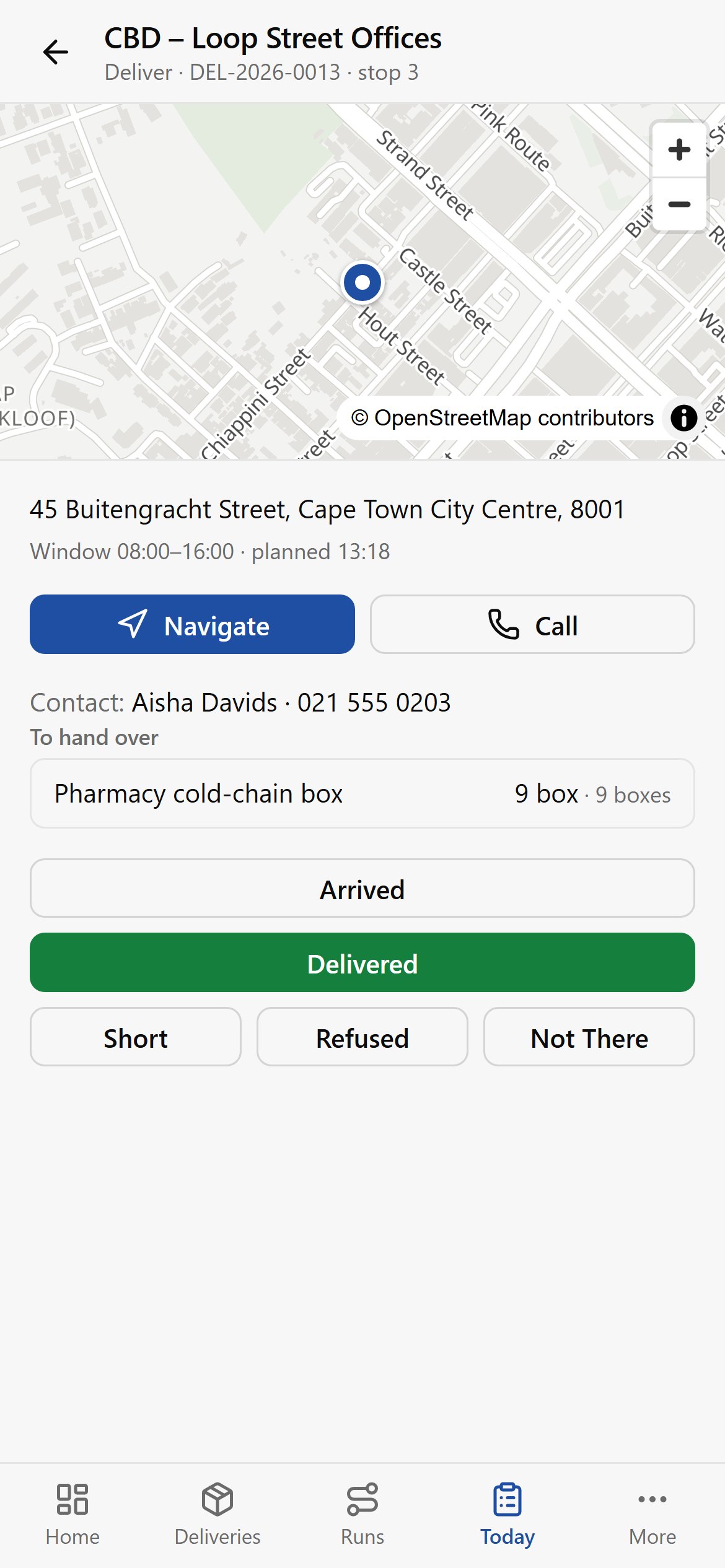
  • Their stops in order, with the address, the contact, the window and Navigate
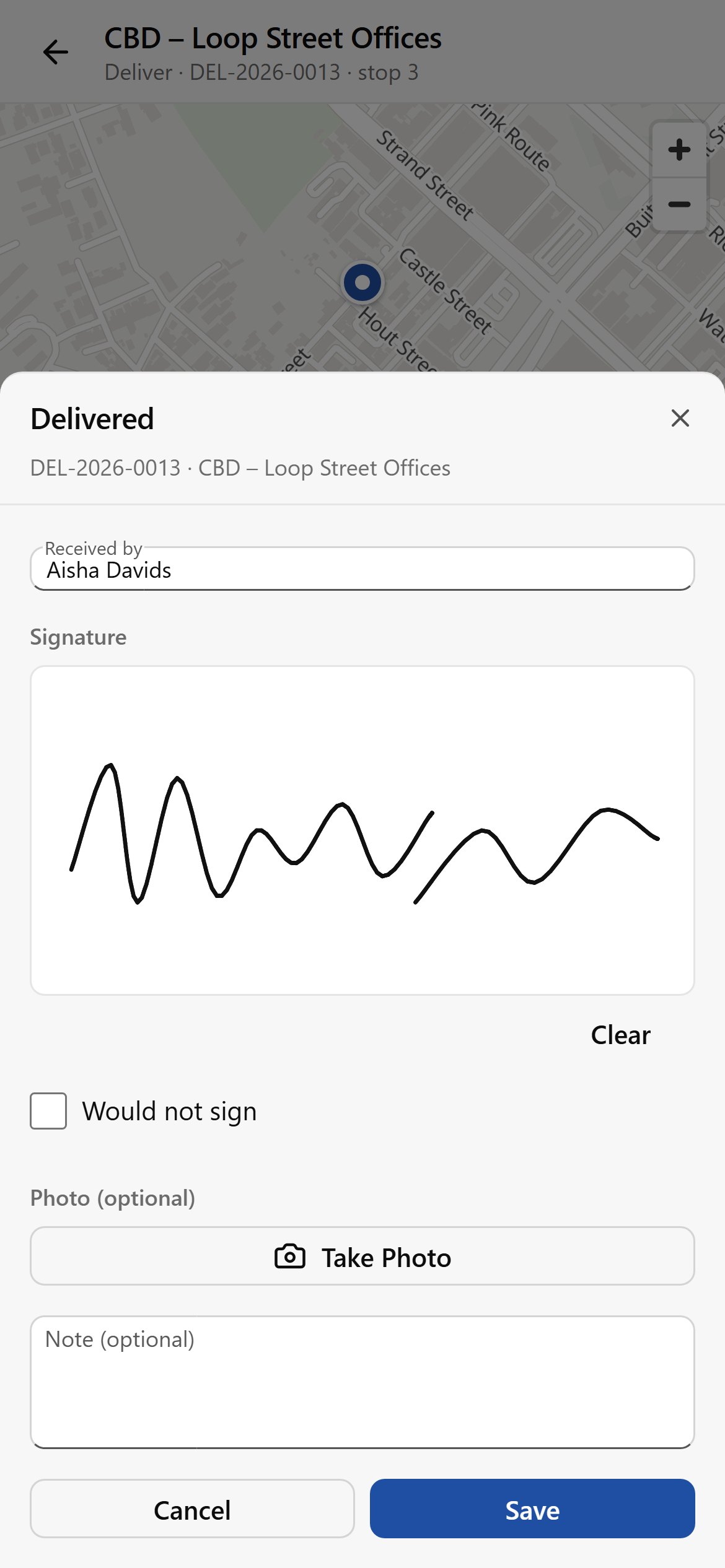
  • Signature, photo, GPS and what was counted, captured at the door
  • One tap when everything arrived intact, which is most of the time
  • Keeps working without signal, and syncs when it returns
The handover on the driver’s phone: who received it, their signature, a photo and a note

And then

Proof your customer can open themselves

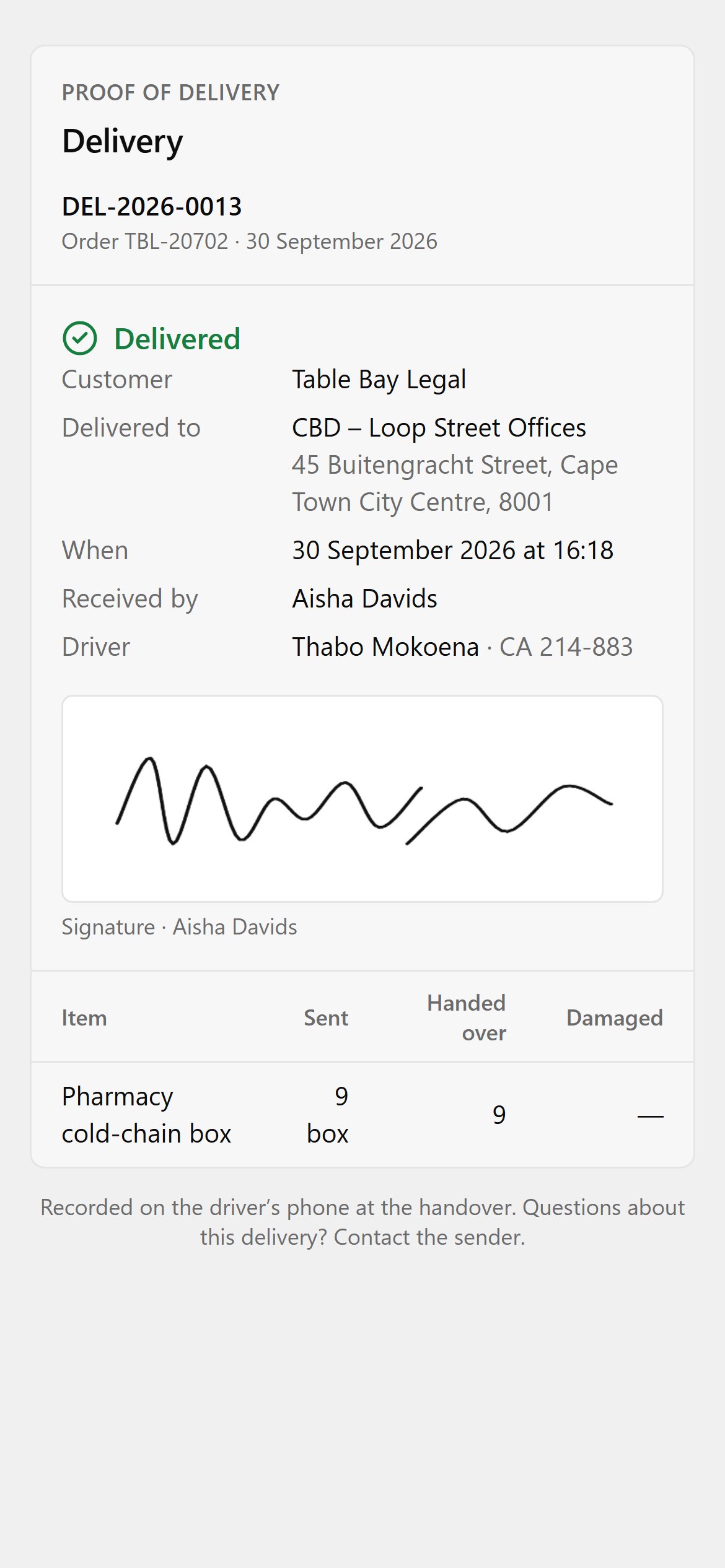
Send the customer a link instead of taking the call. They see the signature and the items counted at the door, without an account.

  • A no-login link to the handover: who signed, when, where, and what was counted
  • The same record as a printed proof of delivery for the accountant
  • Every handover on the Dashboard as it happens
The customer’s proof of delivery: delivered, received by, the driver, the signature and the items

What the monthly fee buys

Software that keeps working

Not a feature list. The features are just how it does the job.

Hosting, backups and support

Answered in this time zone, by people who know the product. Updates arrive without an upgrade project or a consultant’s quote.

Running in days, not a project

A guided tour and a demo company on the first sign-in, then a setup checklist that ticks itself off as you go.

It leaves gaps rather than filling them

An address search is a hint, never a confirmation, and a capacity left blank is no limit rather than zero.

The documentation is public

Readable before you buy, and inside the app every screen’s help opens beside your work.

Every feature, in detail →

Pricing

One price, per driver

No packages to choose between and no minimum to reach. Everything on this page is in it.

R449

per driver per month, excl. VAT

  • The first month is freeAsk us and we set it up for you.
  • One driver is enoughNo minimum, ever.
  • Office users are freeDispatchers and managers cost nothing.
  • Month to monthCancel any time, take your data with you.

AI

AI that helps you set up and answers questions in Help is included. AI in the daily work uses AI credits: packs of US$20, US$50 or US$100 (2,000, 5,000 or 10,000 credits), each lasting 12 months. Your first US$20 pack is free, and one balance serves every Vibe Crafted app you use.

Before you ask

The questions everybody asks last

“We only run three vehicles. Are we too small?”

No. One driver is a real customer, with no minimum and no tier you have to reach before it works properly.

“Our drivers lose signal on half their runs.”

Capture works offline and syncs when the connection returns. The one thing to know: the driver opens Today once with signal; after that it opens in a dead zone too.

“We are not putting an app on drivers’ personal phones.”

You are not. There is nothing to install: it is a web link in the browser they already have.

“How long before we are running?”

Days. No implementation project. Start empty, or look around the demo company first, then add your depot, a vehicle and a driver.

“What happens to our customers’ information?”

A fair question: this record holds names, addresses, phone numbers, signatures and GPS. We tell you where it is stored, who processes it and under what agreement, in writing, before you sign anything.

“What if it turns out not to suit us?”

You cancel that month and take your data with you. No notice period, no exit fee, no conversation you have to book.

  • One driver is enoughNo minimum, no tier to reach.
  • A free first monthAsk us, and we set it up with you.
  • Nothing to installA web link, on the phones you already have.
  • Starts empty, or with a demoTry it on an invented company first.

See it on a morning like yours

Tell us how many drivers you have and what you deliver, and we will show you Delivery planning and proving a day like it. Made by Vibe Crafted Software, from the team behind QuickEasy BOS, business software built and supported for South African companies since 1998.